Static vs dynamic QR code: control the printed destination
Static vs dynamic QR code is a decision about who controls the address after printing. I start by reading the content, because the same square can carry a direct website URL, a provider’s redirect or plain text. Check who maintains that address and what happens if a page moves or an account closes. The address inside the symbol gives you the useful starting point.
How does a static vs dynamic QR code work?
A static code directly stores the supplied content. For a website, that content is a URL; for Wi-Fi it is a structured network record; for a contact it is a vCard. Changing the stored content requires a new symbol. QR Code Generator creates this kind of code locally and does not insert a generator-operated redirect. Copy the encoded content to see the actual text before exporting. The generator does not visit a website to verify that it exists or that its contents are appropriate.
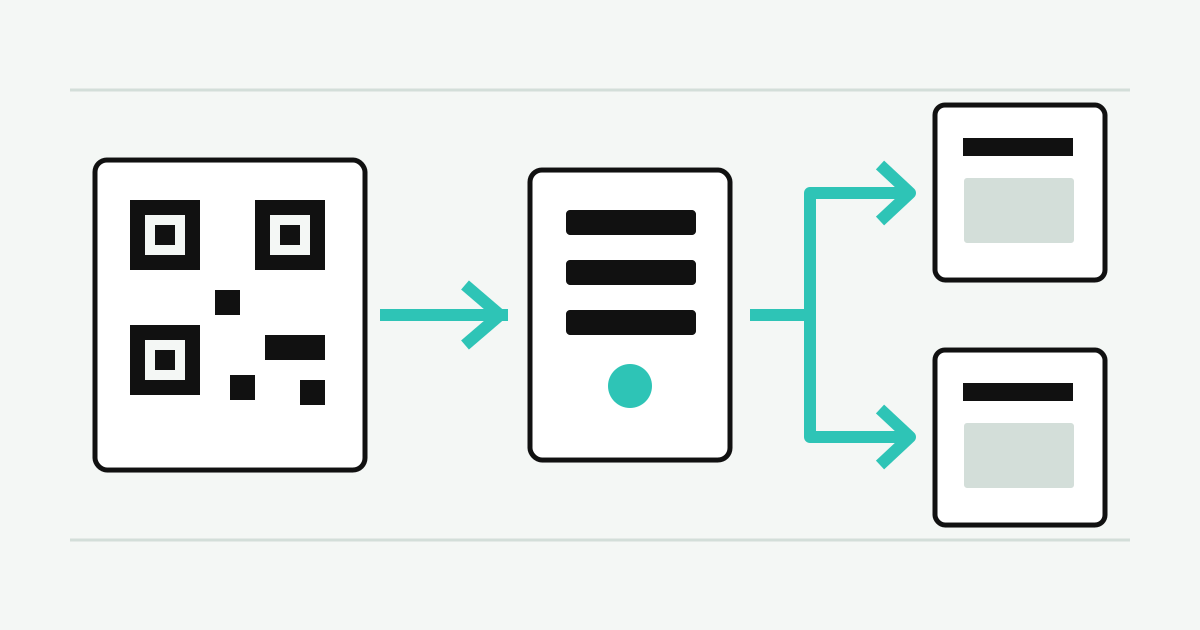
A dynamic QR service normally encodes an intermediate URL. When someone opens that URL, a server directs the visitor to the destination currently configured in an account. The printed symbol stays the same while the server-side mapping changes. That convenience depends on the intermediate domain, the redirect service and your ability to manage the mapping. Specific providers have different rules for edits, scan limits, subscriptions and inactive accounts. Read those terms before printing a code that must remain useful for a long time.
| Choice | Stored content | Where changes happen |
|---|---|---|
| Direct static link | Your destination URL | Content at that same address |
| Provider-managed dynamic link | A provider’s intermediate URL | The provider’s redirect mapping |
| Your own redirect link | A stable URL on your domain | Your web server or hosting configuration |
| Static Wi-Fi or contact | Network credentials or contact fields | A new QR image is needed for changed fields |
Can a static QR code stop working?
The downloaded PNG or SVG has no timer that erases its modules. A code can nevertheless become useless when its website disappears, its domain registration lapses, a redirect stops working or a network password changes. Keep those failure modes separate. If the content is correct and the symbol still decodes, generating another identical image will not repair an unavailable destination. Repair the destination or replace the printed code with new content.
For a hypothetical cafe menu, suppose the printed code stores https://example.com/menu. Updating the menu at that exact path leaves the QR image useful without any special dynamic service. Moving the menu to another address and removing the old path breaks the visitor’s route. Maintaining a redirect from the old path can preserve it. The generator cannot install that redirect for you. I choose a short, stable path that I can maintain before I spend time matching the code’s colors to the printed menu.
How can I keep a printed QR link working?
A static symbol can point to a redirect under your own domain. The QR remains static because its stored URL does not change; your server decides where visitors go. This is useful when destination changes are likely and you already manage a website. It adds responsibility: preserve the domain, HTTPS access, route configuration and hosting. A direct link is simpler when the final address is stable. A managed service may be appropriate when its editing tools and support justify the dependency.
I avoid storing a temporary preview address in something expensive to reprint. Check whether the URL requires a login, includes a short-lived access token or exposes a private resource. A long query string can also increase symbol density. Remove parameters only if you know that doing so preserves the intended destination. QR Code Generator neither shortens links nor assesses which parameters a website requires. Its URL field adds HTTPS to a bare domain and rejects unsupported schemes and embedded login credentials.
Does generating a QR code track scans?
Local encoding means the content is processed by the tool in your browser. It does not mean that a later visit to a website is anonymous. The destination server can receive the usual web request, and an intermediate redirect service can observe requests reaching its domain. A static image also does not supply a scan counter. A camera may recognize a symbol without opening the destination, so web requests and camera detections are different events.
The image itself reveals the content to someone who can decode it. That matters for Wi-Fi passwords, personal contact details and draft messages. Do not treat an embedded logo or a colored module style as encryption. Save locally is optional and keeps only the active content type with its settings; saving a website link excludes credentials left in an inactive Wi-Fi tab. Clearing that history does not erase downloaded files, printed copies or clipboard contents. The Wi-Fi QR guide explains the credential-sharing choices in more detail.
How do I test the link and the printed QR code?
A correct destination and a readable pattern are two independent requirements. Inspect the content first, then check the destination yourself in the appropriate browser or application. A recognizable QR can offer the wrong network or import the wrong contact just as easily as the right one. Conversely, the intended URL may be perfectly valid while a cropped border prevents a camera from finding the symbol. The print-size guide explains why the full border belongs in the printed artwork.
- Read the encoded content and identify whether it is a direct address or an intermediate one.
- Open the intended destination yourself and check permissions, path and content.
- For a redirect, confirm who controls the mapping and what happens if the account or service stops.
- Export the final PNG or SVG and preserve the complete blank border.
- Test the final printed size with representative scanning devices and confirm the offered action.
- Keep a record of the content and where its destination is maintained for the next reprint.
Four clear modules on each side follow DENSO WAVE’s quiet-zone guidance. That protects the symbol’s visual geometry; it cannot preserve an expired domain or an old password. Generate a new QR code with the QR code generator when the stored content must change. Keep an existing print only when both the decoded content and its intended action still match what you want readers to receive.
FAQ
Can I change a static QR code after printing?
Its stored content cannot change. You can update content at the same URL or maintain a redirect at that URL if you control it.
Do downloaded QR codes expire?
The image has no expiry timer. Domains, destination pages, redirect services and Wi-Fi credentials can stop working independently.
Does this generator create dynamic QR codes?
No. It directly encodes your supplied content and provides no redirect dashboard or scan analytics.
Can a static QR code point to my own redirect?
Yes. Its stored URL remains static while your server controls where that URL sends visitors.